See the day ahead.
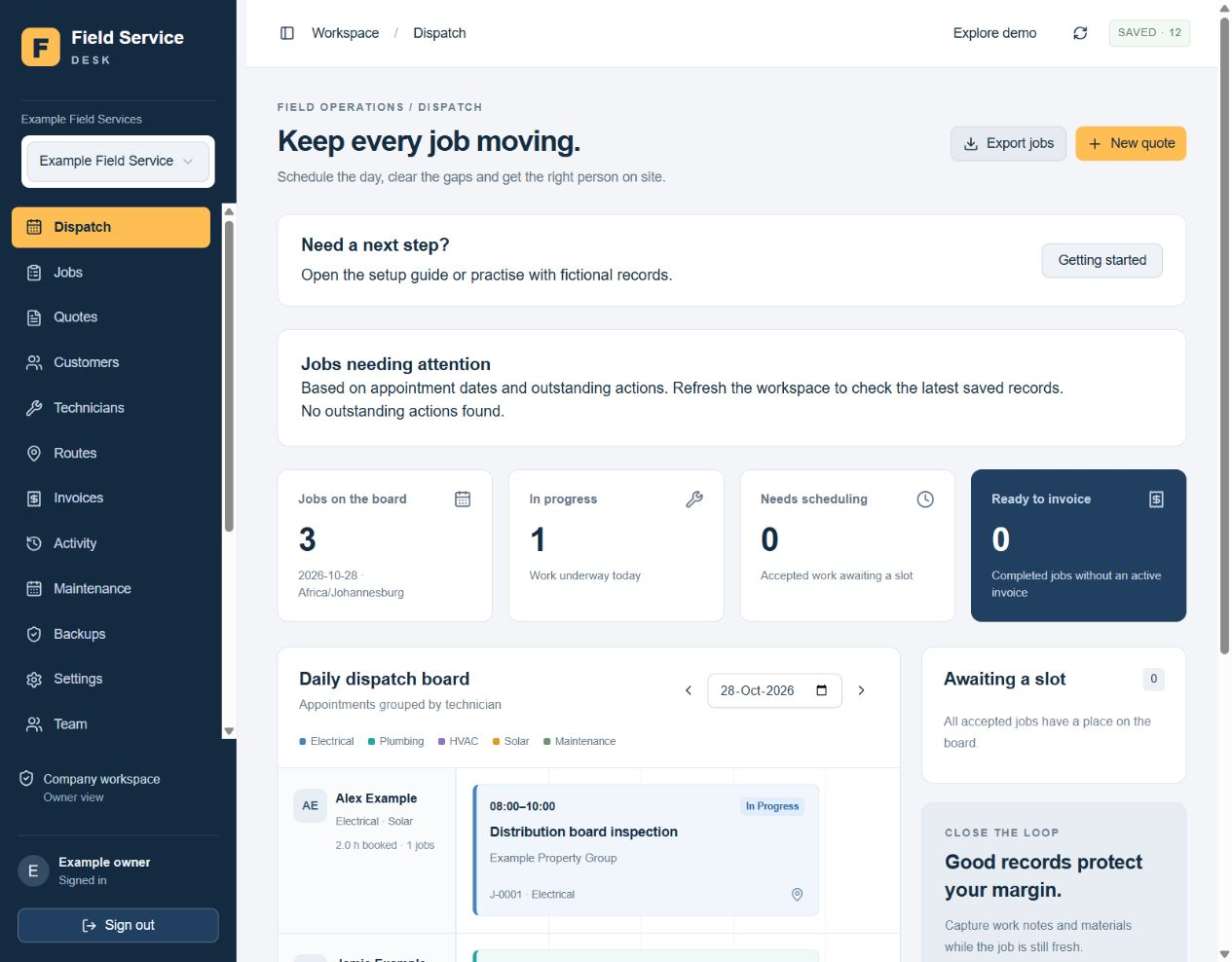
Keep customer details, quotes and appointments connected. Assign technicians and review the daily dispatch board.
- Customer and job history
- Quotes and scheduling
- Working hours, skill and overlap checks
- Company time-zone settings
PLUMBING · ELECTRICAL · HVAC · MAINTENANCE
Plan jobs, keep site records together and prepare branded quotes and invoices. Give your office and technicians one clear workflow—from the first enquiry to the payment record.
Try fictional work in the demo. Company access is arranged after review.
Enquiry → Quote → Job → Invoice
FOR OWNER-OPERATORS AND SMALL OFFICE / FIELD TEAMS
Bring those details into a repeatable process. Field Service Desk helps plumbing, electrical, HVAC, maintenance and solar teams keep appointments, work records and customer paperwork connected.
Know who is going where.
Review the day and each technician’s assigned work.
Keep evidence with the job.
Find notes, photos and supporting documents together.
Prepare the invoice from the work.
Review agreed items and approved extras before issuing.
FROM THE FIRST CALL TO THE FINAL RECORD
Give the office and technicians a shared place to follow the work, with access suited to each person's role.
Keep customer details, quotes and appointments connected. Assign technicians and review the daily dispatch board.
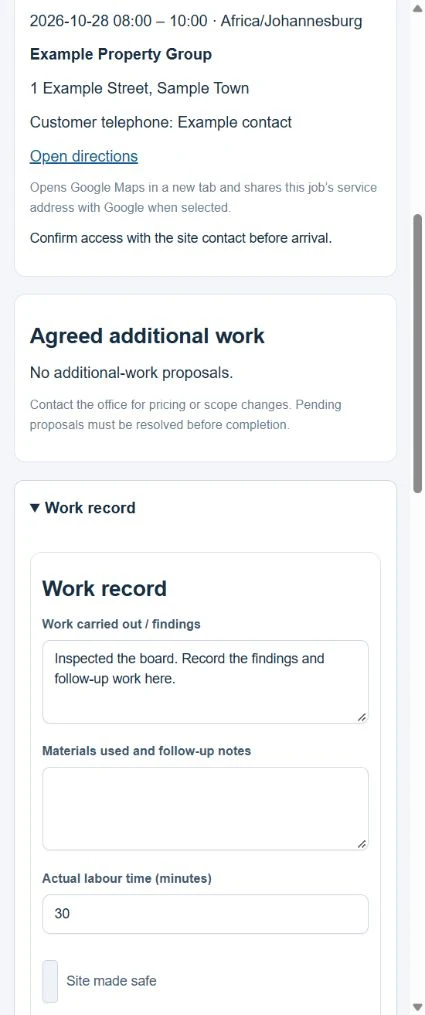
Use the mobile field view to record work notes, visits and materials against assigned jobs.
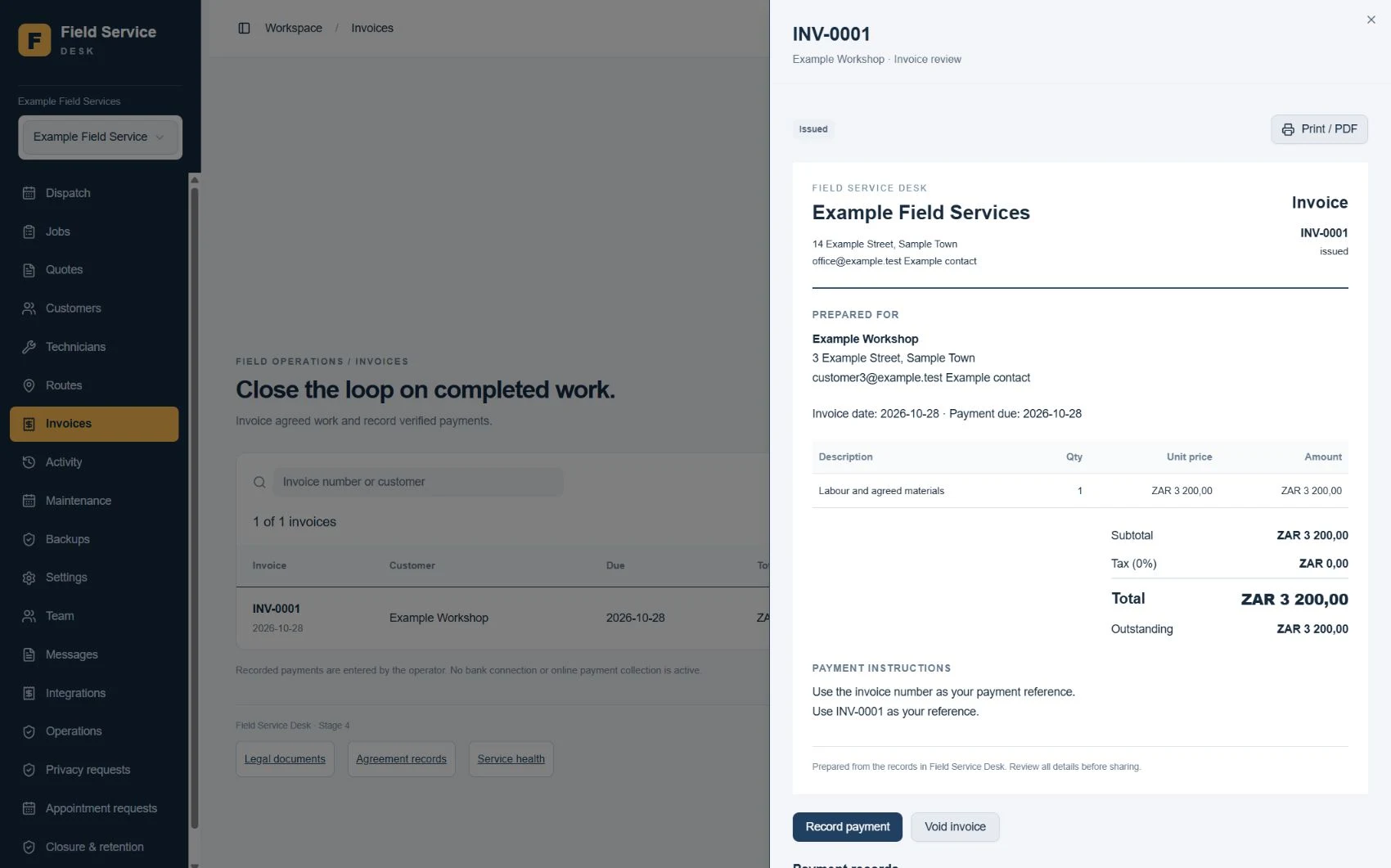
Prepare customer invoices, record payments manually and export records for review or recovery.
SEE THE ACTUAL WORKSPACE
Review appointments, assigned technicians and work needing attention on the daily dispatch board. This screen uses fictional training records.
Use the practice demo to explore the workflow. Available actions depend on your role and the current job status.
Explore the practice demo →FROM THE OFFICE TO THE JOB SITE
These application screens use fictional training records. Explore the practice demo to see the workflow for yourself.
Review the agreed scope, approved additional work and totals before issuing. Your current company logo can be selected for new documents; each invoice retains its draft-time branding.
Technicians see assigned work, record findings and materials, and complete the required work checks. The office retains the wider company view.
BUILT AROUND THE RECORDS YOU NEED
Give your team a practical place for the details that are easy to lose between the site and the office.
Add photographs to a job, write useful captions and keep the visual record beside the work notes. Authorised technicians can upload to their assigned editable jobs.
Upload your company logo for quotes, job cards and invoices. Present your business consistently, while older invoices retain the logo chosen when their draft was created.
Store company records or attach compliance certificates, inspection reports and other authorised PDFs or images to the relevant job.
Record additional-work proposals and their approval references. Approved items carry into the invoice; unresolved proposals must be reviewed before completion.
Check recorded trades, working hours and overlapping appointments, including the travel buffer you reserve. Directions links help technicians find the site.
Enable a company request page for customers to submit their details. Your office reviews availability and confirms the work.
Maintenance plans prepare the next draft quote for review when you run a due plan.
Capture work notes, checklists, materials and customer acknowledgement with an optional drawn signature.
Owners manage team membership. Technicians work with assigned jobs; company documents stay with the office.
PRACTICAL IN THE FIELD
Enable local drafts on an already loaded job card. Save supported notes on that device, then sync manually when you reconnect.
Record work, materials and checks against assigned jobs. When connected, add photos and access current job documents.
Read how local drafts work ↓TRAINING MANUALS INCLUDED
Training is included for subscribing teams. Separate owner and technician manuals explain the workflow with numbered steps, screenshots, troubleshooting and practice exercises. Additional guides cover photos, company logos and supporting documents.

A 32-page guide to business setup, team access, quotes, scheduling, job records, invoices, payments, backups and review registers.

A 16-page guide to assigned jobs, work notes, visits, checklists, handover and completion, including device-only drafts and manual syncing.
Full manuals are provided inside the software for subscribing teams. The images above are cover previews; this website does not offer manual downloads.
Fictional examples, clickable contents and searchable text help users find a task. Invitations, account recovery and service faults may still need assistance.
SIMPLE MONTHLY PACKAGES
Every package includes one company workspace, the current standard release and subscriber training manuals. The person allowance includes the owner, office users and technicians.
Prices are monthly ZAR references. The supplier is not registered for VAT; no VAT is charged. International figures are approximate guides only. Your written offer confirms the agreed currency, exchange conversion, service dates and total before payment.
SOLO
1 person total
For an owner-operator who manages jobs and completes the field work personally.
Approx. US$15 · £11 · €13
A$21 · NZ$27 · C$21
SMALL TEAM
Up to 3 people total
For a small office and field team that needs shared scheduling and controlled access.
Approx. US$27 · £20 · €24
A$38 · NZ$48 · C$38
TEAM
Up to 6 people total
For a growing team that needs more authorised people in one shared workspace.
Approx. US$45 · £34 · €40
A$64 · NZ$80 · C$63
Ask for a tailored quotation. We review expected history, active work, file use and support needs before confirming a larger arrangement.
Packages are monthly prepaid. There is no automatic debit, card collection or automatic renewal. Current record and file allowances apply; this is not an unlimited-storage service.
A CLEAR START FOR YOUR TEAM
We confirm the fit and the subscription details before your paid service begins.
Try fictional work in the practice demo, then tell us your country, team size and priorities.
Receive the written monthly price, user allowance, exact service dates and applicable service documents.
Complete the agreement and pay the supplier invoice through the agreed payment route. There is no automatic debit.
Receive activation confirmation, set up your business and authorised team, and use the included training manuals.
BEFORE YOU START
Enable local drafts while connected and keep the loaded field page open. Supported note changes can be saved on the original device and browser, then synced manually after reconnecting. Signing in, starting or reloading the app, file uploads and other job actions need a connection. This is not a fully offline app.
Stored certificates are not validated or certified by the software. Expiry indicators support manual review, without automatic reminders. Messages are prepared for external sending; there is no automatic email or SMS delivery. Maps use directions links, without live tracking or route optimisation. Photos and supporting files need a connection.
Yes. Open the workspace and explore the practice demo with fictional records. Live company access is invitation-based and reviewed separately.
Technician access is linked to their assigned work. Owners manage team membership; office users have broader operational access. Use the practice workflow to check the roles that suit your team.
The platform includes multiple currencies, including ZAR, GBP, USD, EUR, CAD, AUD and NZD, and a company time-zone setting. This does not provide automatic exchange-rate conversion or country-specific tax advice.
Direct accounting synchronisation is not currently available. Accounting exports can support a manual review and handover to your bookkeeper.
After we agree the written service offer and applicable terms, an invoice and payment instructions can be provided. This website does not collect card details or process payments.
Yes. Subscribing teams receive owner and technician PDF manuals inside the software, plus guides for photos, logos and supporting documents. They include illustrated steps, troubleshooting and practice exercises. This website shows cover previews only.
Yes. Upload job photos, select a company logo for quotes, job cards and invoices, and store supporting PDFs or images at company or job level. Role-based permissions and storage allowances apply. Certificates are stored as records; the software does not validate or certify them.
A company can enable a public appointment-request page with submission verification. Requests go to the office for review and follow-up; they are not automatically confirmed bookings.
Yes. Download business-record backups, accounting exports and separate photo, logo and supporting-document archives. A records backup does not contain every system record or the stored file bytes. Keep protected independent copies and original evidence where needed.
Yes. The initial service is intended for small teams and has record, workspace and file allowances. Your written offer identifies the service scope. Review capacity with us before moving a large history into the system; there is no unlimited-storage claim.
Contact Jacobus Venter at hello@fsm-desk.com. Email support hours are Monday to Friday, 09:00–16:00 South African time, excluding South African public holidays. The initial response target is two business days.
A DIRECT CONTACT BEHIND THE SERVICE
Field Service Desk is independently operated from South Africa. Jacobus handles service enquiries, onboarding and email support. The focus is a practical, understandable workflow for small trade teams, supported by illustrated owner and technician manuals.
Discuss your team’s workflow →TAKE THE NEXT STEP
Try the demo first, or send Jacobus an enquiry for a demonstration and a written monthly quote.
Try the live demo ↗Request a demonstration or a written quote. No sign-in or email app is needed. This is an enquiry, not a subscription or payment.
Prefer email? hello@fsm-desk.com. Enquiries are reviewed manually during business hours. No automatic confirmation email is sent.